
How AI tokens are counted
Where pages meter your output, AI tokens meter your use of the AI Assistant. Every time the assistant reads your template and writes a change, that work is measured in tokens and subtracted from your monthly token balance.
The token balance
Section titled “The token balance”Tokens work exactly like pages — a running balance, not a percentage:
- At the start of each billing period, a Monthly fee entry adds your plan’s included tokens.
- Every AI request subtracts the tokens it consumed.
- Any tokens you buy on top are added to the balance too — and unlike your monthly allowance, those don’t expire at the reset date. Purchased tokens are held separately from your subscription and roll over until you use them.
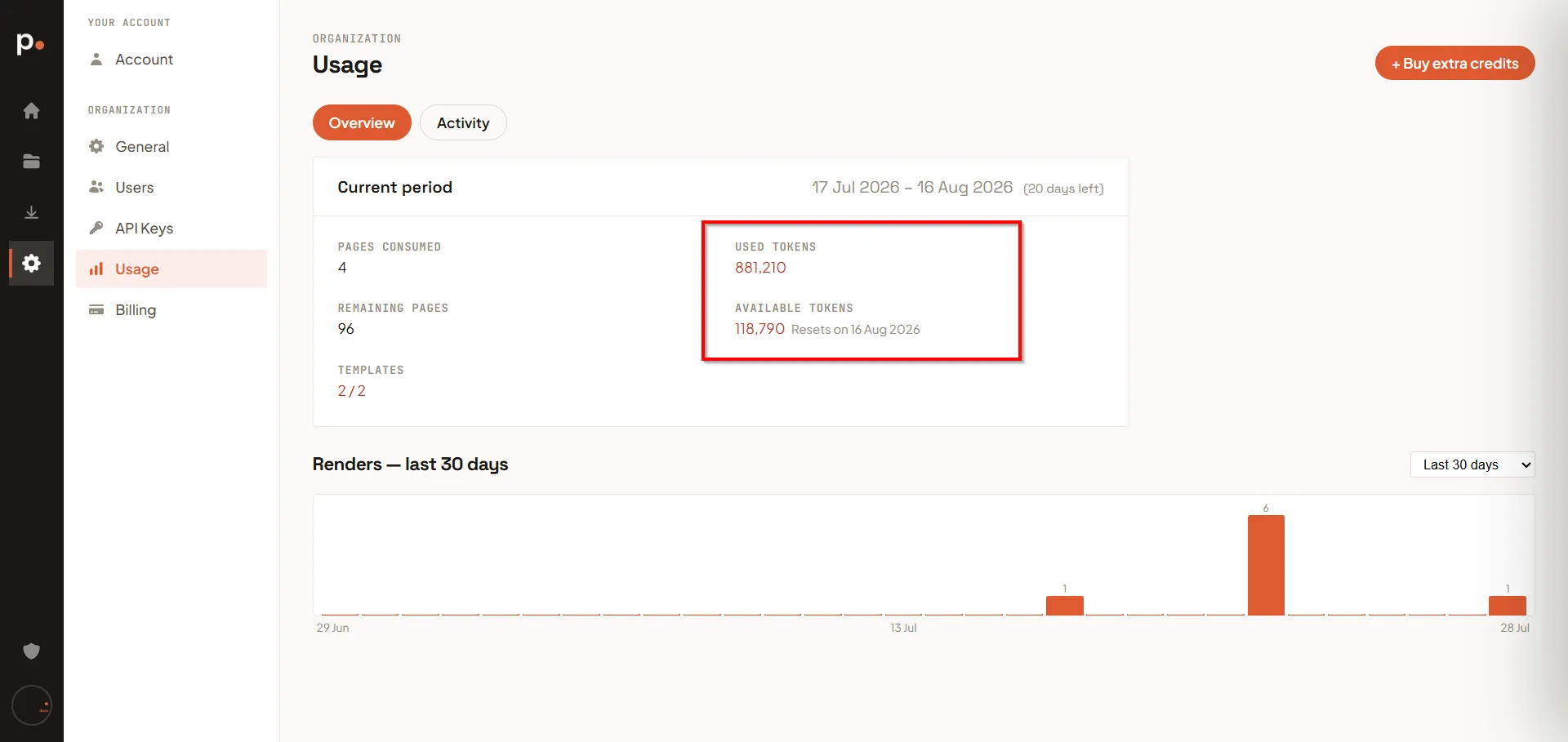
On the Free plan the monthly entry adds 1,000,000 tokens. Settings → Usage → Overview shows Used tokens, Available tokens, and the date the allowance resets.
What consumes tokens
Section titled “What consumes tokens”| Action | Consumes tokens? |
|---|---|
| Asking the AI Assistant to generate a template from a prompt | Yes |
| Asking the assistant to change an existing template (“make the totals bold”) | Yes |
| Generating a template from a document | Yes — logged separately as Document analysis |
| Editing the template, Sample Data, or Translations by hand | No |
| Previewing, test rendering, or production rendering | No — renders consume pages, never tokens |
| Undoing an AI change | No — but the tokens already spent are not refunded |
The distinction that matters: the assistant costs tokens, rendering costs pages. They are separate allowances and running out of one does not block the other.
Why the cost per request varies so much
Section titled “Why the cost per request varies so much”Token cost is not per message — it scales with how much the assistant has to read and write. In practice a single request can range from under 3,000 tokens to almost 200,000:
| Kind of request | Typical cost |
|---|---|
| A small, targeted tweak on a simple template | ~2,500 – 6,000 |
| Analysing an uploaded document (Document analysis) | ~9,000 – 10,000 |
| Generating a substantial template from a prompt | ~25,000 – 50,000 |
| A change against a large, complex template | ~150,000 – 200,000 |
Two things drive the number up:
- The size of the template. The assistant has to read the whole template definition before it can change anything, so the same instruction costs far more on a long, complex template than on a short one.
- The size of the change. Rewriting a whole layout writes far more output than renaming a field.
Reading the token ledger
Section titled “Reading the token ledger”Settings → Usage → Activity → AI tokens records every token movement.
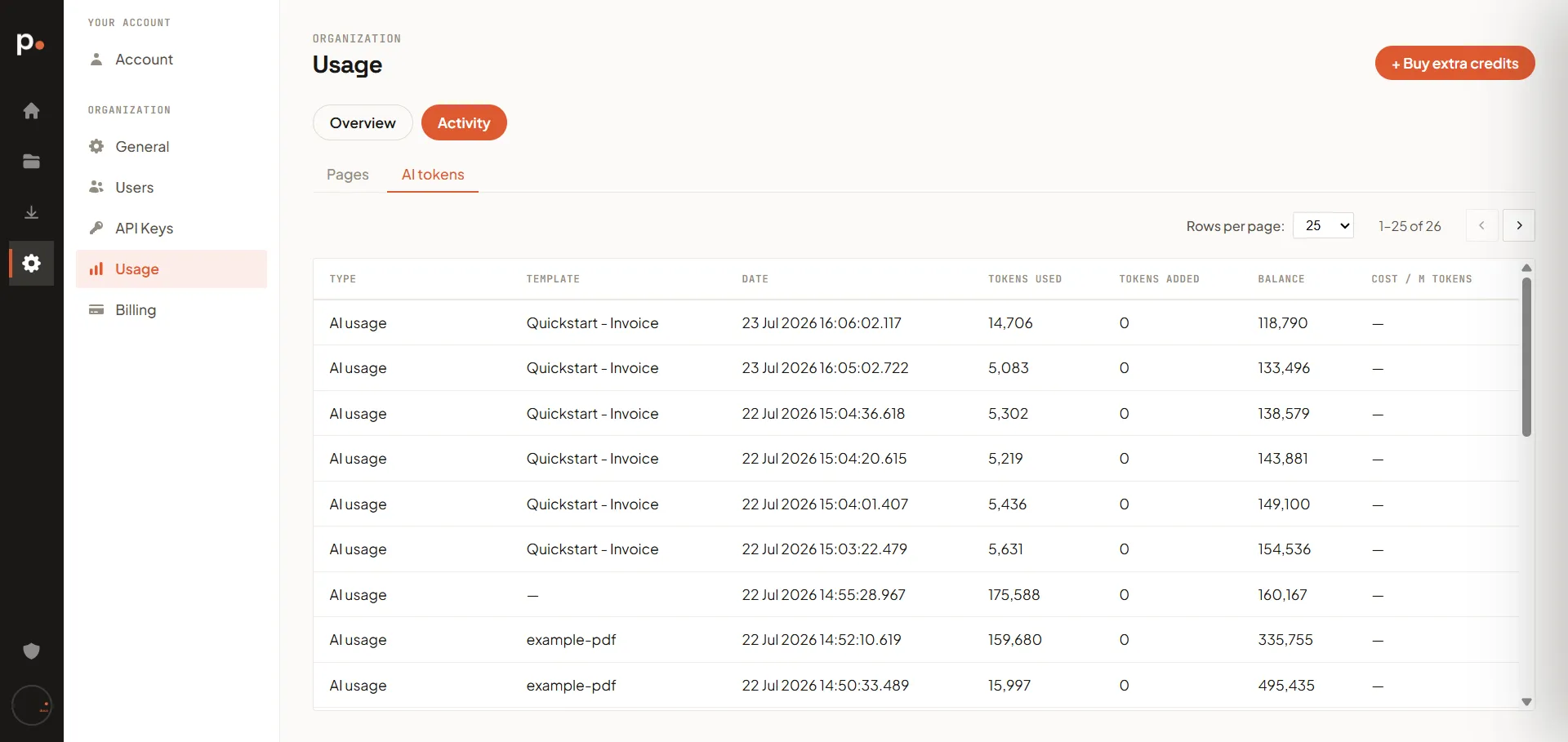
Each row shows:
| Column | Meaning |
|---|---|
| Type | Monthly fee (allowance added), AI usage (an assistant request), or Document analysis (an uploaded file being read) |
| Template | The template the request applied to — blank for requests not tied to one |
| Date | Timestamp, to the millisecond |
| Tokens used / Tokens added | The movement itself |
| Balance | Your remaining tokens after this entry |
| Cost / M tokens | What you were charged per million tokens, for tokens billed beyond your included allowance |
Like the Pages ledger it is newest-first, so read bottom-up to follow the balance forward.
Keeping token use down
Section titled “Keeping token use down”- Be specific. “Make the invoice totals bold” costs less and works better than “improve this”. See Writing good AI prompts.
- Edit small things by hand. Changing a colour, a label, or a margin in the editor or the Page Properties form costs nothing.
- Batch related instructions into one request instead of a back-and-forth of small ones — each round trip re-reads the whole template.
- Start from an example or a file rather than describing a complex document from scratch.
Running out of tokens
Section titled “Running out of tokens”When the balance reaches zero the AI Assistant stops until you top up or the period resets. Manual editing and rendering keep working — only the assistant is blocked. To carry on:
- Wait for the reset date shown on the Usage page.
- Buy extra tokens to add to the current balance.
- Upgrade your plan for a higher monthly allowance.
Related articles
Section titled “Related articles”- How pages are counted — the other thing Pagr meters.
- Buy extra credits — top up tokens mid-period.
- Writing good AI prompts — get more out of each request.
- Generate a template from a document of your own — what Document analysis entries come from.
- Billing — your plan’s included tokens.