
Variables and the data model
A template has two kinds of content: the fixed parts that are the same on every document (labels, layout, styling) and the variable parts that change on each render (a name, a date, a list of line items). The variable parts are filled in from data when you render.
The set of variables a template expects — their names and shapes — is its data model. This page explains where that model comes from and how it becomes the form you fill in when you render.
Where variables come from
Section titled “Where variables come from”You don’t declare variables separately — the Sample Data tab is the data model. It’s a JSON object, and every property in it is a variable you can reference from the template:
{ "invoiceNumber": "INV-2026-001", "issueDate": "2026-07-22", "customerName": "John Smith", "lineItems": [ { "description": "Consulting", "quantity": 10, "unitPrice": 150, "total": 1500 } ], "grandTotal": 4025}You reference a variable from the template with a {{ }} placeholder — {{invoiceNumber}}, {{customerName}} — and format or bind it as described in Template structure.
Data types
Section titled “Data types”Sample Data is plain JSON, so a variable is one of the usual JSON types — and the type decides how you use it:
- Text and numbers —
"INV-2026-001",3500. Referenced directly:{{invoiceNumber}},{{subtotal}}. - Dates — stored as text (
"2026-07-22") and formatted where you use them:{{issueDate as date(dd-MM-yyyy)}}. - Booleans —
true/false. Handy for conditions:"condition": "{{isPaid}}". - Objects — group related values; reach inside with a dot:
{{customer.name}}. - Collections (arrays) — a list of items, like
lineItems. These drive repeating content: a table row,loop, orlistbound to the collection renders once per item, and inside it you reference each item’s own fields ({{description}},{{quantity}}). See Repeating content.
Seeing variables in the preview
Section titled “Seeing variables in the preview”The preview shows finished values — “Sheryl Baxter” looks exactly the same whether it was typed into the template or filled in from your data. The Data fields button below the preview reveals the difference: every element that gets its content from data is tinted and labelled with the variable behind it.
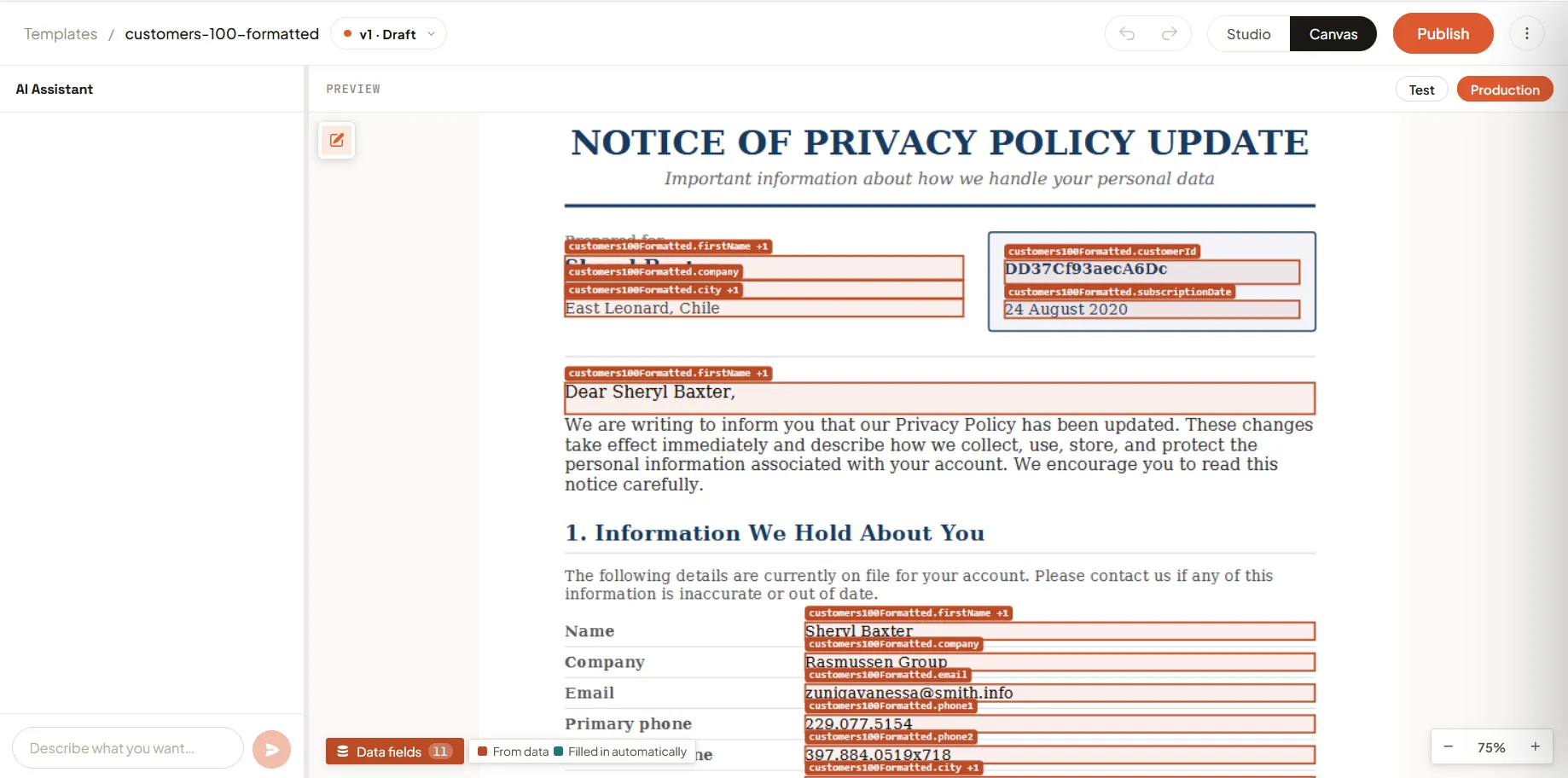
It works in both Studio and Canvas, and it’s the only way to see a template’s variables without opening Studio. The number on the button is how many distinct variables this document draws from — 11 in the screenshot above.
What the colours mean
Section titled “What the colours mean”| Key | What it marks |
|---|---|
| From data — rust outline and tint | A variable: you supply the value. On a test render it comes from your sample data; in production it comes from whatever calls Pagr. |
| Filled in automatically — near-black, fainter | Something Pagr resolves by itself: a {{_system.*}} value or a translated string. There’s nothing for you to send. See System Data and translations. |
An element bound to both is drawn as From data, because that’s the part that needs a value from you. The legend only lists the keys actually present — and if nothing on the page comes from data, it says so instead.
Reading the labels
Section titled “Reading the labels”Each pill is the variable path as you’d write it in a {{ }} placeholder — customer.name, lineItems[].price. A few details worth knowing:
- Several variables in one element are listed together, separated by
·. When that gets too long to fit, it’s shortened to the first one plus a count:customers100Formatted.firstName +1. - A
t:prefix marks a translation key rather than a variable. - Repeating wrappers — a
loop,table, orrow— get a dashed outline and no tint, so the bound fields inside them stay readable. See Repeating content. - One pill per element per page. A table row that repeats thirty times would otherwise stack thirty identical labels, and a pill is skipped where the element is too small or another label already sits there. A tinted box with no pill is normal — the tint is the signal.
The render form
Section titled “The render form”When you render a version, Pagr builds a form automatically from the data model — one field per variable, pre-filled with the sample data. You can change any value before rendering.
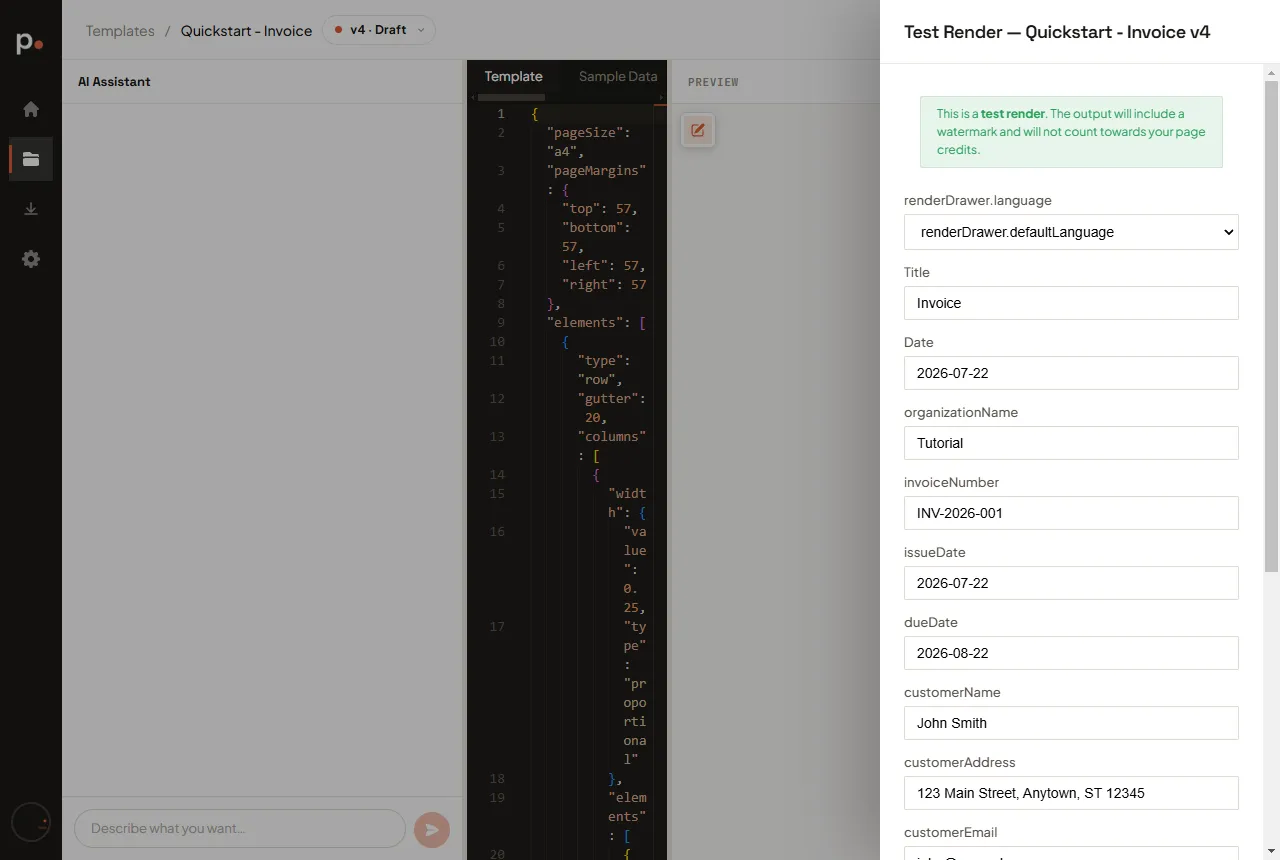
- Text and number variables show a simple input.
- Collections and objects show a JSON field, where you edit the raw structure — for example, adding or removing entries in
lineItems.
Fill in the values and click Render. Use the Test / Production toggle to choose the environment — a Test render is watermarked and free, so use it while you design. See Rendering a template.
The data model is locked once published
Section titled “The data model is locked once published”Because your live integration relies on the variables staying stable, publishing a version locks its data model — you can no longer change the sample data or which variables exist (you can still edit the layout and translations). Finalise your variables before you publish.
To change the data model of a published version, duplicate it into a new draft, adjust the data there, and publish that. See Versions and publishing.
Rendering with real data
Section titled “Rendering with real data”The sample data only fills previews and test renders. In production, your integration sends its own values for the same variable names — Pagr merges them into the template exactly as the render form does. So the data model is effectively the contract between the template and whatever calls it:
- Keep variable names stable once a version is published.
- Match the shape — a variable the template loops over must be a collection; a variable used with
{{customer.name}}must be an object with aname. {{_system.*}}values are the exception: Pagr fills those automatically, you never send them. See Editing a template by hand → System Data.
Related articles
Section titled “Related articles”- Template structure — the
{{ }}placeholder and expression syntax that consumes these variables. - Editing a template by hand — the Sample Data tab where the data model lives.
- Studio and Canvas — where the Data fields toggle lives, in both views.
- Templates — versions, rendering, and publishing.